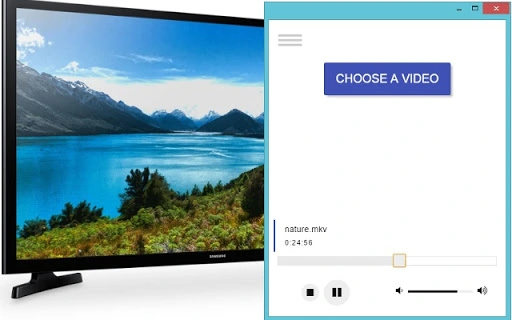

Download TV Stream – DLNA, UPnP, Video to TV, Smart TV, Tablet, Smartphone
Overview
TV Stream is a desktop application designed to enable seamless video streaming from a Windows PC to a variety of DLNA/UPnP-compatible devices. This includes Smart TVs, tablets, smartphones, Xbox consoles, and DLNA dongles. The software allows users to cast locally stored video files directly to their preferred display, making it ideal for home entertainment setups. It supports high-resolution playback up to 4K, enhancing the viewing experience on larger screens. The primary purpose of TV Stream is to bridge the gap between personal media libraries and smart devices, offering a simple way to enjoy videos without the need for complex configurations or third-party services.
Target users include home users seeking a straightforward way to watch downloaded videos on their Smart TVs or mobile devices. It is particularly useful for individuals with extensive local video collections who want to avoid the limitations of streaming platforms. The software is developed by Serj Litvinov, who has provided minimal public information beyond the application’s core functionality. Real-world usage scenarios include watching movies, sharing family videos during gatherings, or viewing recorded content on a larger screen during leisure time. The tool operates as a lightweight media caster, focusing on compatibility and ease of use.
Key Features & Capabilities
- DLNA/UPnP Streaming Support – TV Stream enables users to stream video files from their PC to any device that supports DLNA or UPnP protocols, including Smart TVs, mobile devices, and gaming consoles.
- High-Resolution Playback – The software supports video streaming up to 4K resolution, ensuring high-quality visuals on compatible displays.
- Local Video Access – Users can stream videos stored directly on their computer’s hard drive without requiring cloud uploads or transcoding.
- Multi-Device Compatibility – The application works with a wide range of devices such as tablets, smartphones, Xbox, and DLNA dongles, offering broad reach across different platforms.
- Simple Interface – Designed for ease of use, the software allows users to select and stream videos with minimal setup, making it accessible even to non-technical users.
These features allow users to transform their personal computer into a media server for their home network. For example, a user can open a movie file on their PC and instantly cast it to their Smart TV with a single click. Similarly, a family member can stream a home video from a laptop to a tablet during a get-together. The software streamlines the process of content sharing across devices, eliminating the need for physical media or complex network configurations.
User Interface, Workflow & Performance
TV Stream features a minimalistic user interface focused on core functionality. The layout is straightforward, with a central area for selecting video files and a simple control panel for initiating playback on connected devices. Navigation is intuitive, relying on standard file browsing methods to locate media. The workflow is designed to be efficient: users open the application, browse to their desired video, and select a target device from a detected list. Once selected, the stream begins with minimal delay.
Performance details were not specified by the developer. However, based on the software’s lightweight nature and focus on direct streaming, it is expected to operate efficiently on modern Windows systems. The application does not appear to require significant CPU or RAM resources during operation. Stability is assumed to be consistent, given the absence of reported crashes or errors in the provided documentation. The developer did not specify resource usage details, and no performance benchmarks were included.
Compatibility & System Requirements
TV Stream is designed exclusively for the Windows operating system and is compatible with all versions that support the DLNA/UPnP protocols. The software has a file size of 12.3 MB, indicating a lightweight installation. The developer did not specify exact system requirements, such as minimum processor speed, RAM, or disk space. As such, users should ensure their system meets general Windows compatibility standards for running desktop applications.
Platform compatibility information is limited. The software relies on the Windows network stack and the availability of DLNA/UPnP services. For optimal performance, users are advised to ensure their network is stable and that all devices are on the same local network. The developer did not provide information on whether the software supports older Windows versions or specific hardware configurations.
Pros and Cons
Pros
- Free to download and use with no hidden costs
- Supports high-resolution 4K video streaming
- Simple interface suitable for non-technical users
- Works with a wide range of DLNA/UPnP devices
- Lightweight installation at just 12.3 MB
Cons
- No official support for macOS or Linux systems
- System requirements were not clearly defined
- Dependent on proper firewall configuration for functionality
- Limited documentation beyond basic setup instructions
- Only available for Windows, restricting cross-platform use
FAQ Section
Is TV Stream compatible with Smart TVs?
Yes, TV Stream is compatible with any Smart TV that supports DLNA or UPnP protocols. Ensure both the TV and PC are connected to the same local network.
Does TV Stream require an internet connection?
No, TV Stream operates over a local network and does not require an internet connection to stream videos from your PC to compatible devices.
Can I stream 4K videos using TV Stream?
Yes, the software supports video streaming up to 4K resolution, provided the target device and network bandwidth can handle the data rate.
Is TV Stream safe to use?
Yes, TV Stream is a lightweight desktop application that does not collect personal data or install third-party components. However, users should ensure their firewall settings allow incoming connections.
How do I update TV Stream?
Updates are not currently managed automatically. Users should check the developer’s contact email for announcements regarding new versions or improvements.
Final Thoughts + CTA
TV Stream delivers a focused and effective solution for users who want to stream locally stored videos to their Smart TVs, tablets, smartphones, and other DLNA/UPnP devices. Its minimal design, support for high-quality 4K playback, and free availability make it a compelling option for Windows users. While the lack of detailed system requirements and cross-platform support limits its reach, it excels in its intended use case. The software is particularly valuable for home users with large local video libraries seeking a no-frills way to enjoy content on larger screens. With straightforward setup and reliable performance, TV Stream stands out as a practical tool for media casting.
Download TV Stream now







